Every transaction spends a moment in limbo between “broadcast” and “mined”. That waiting room is the mempool, and it is where a lot of the interesting work in Ethereum happens: a searcher spots an arbitrage before it lands, a bot front-runs a large swap, a liquidation watcher sees the transaction that will tip a position underwater. If you want to act on a transaction before it is final, you have to read the mempool.
Doing that well is harder than wiring up a single eth_subscribe call. You have to deal with the difference between a transaction hash and a full transaction body, with the fact that no two nodes see exactly the same pool, and with the latency of every round-trip you make to inspect what you found. This post walks through the practical mechanics of reading the mempool with ethers.js, then explains why where your code runs decides whether any of it is fast enough to matter.
What the mempool actually is
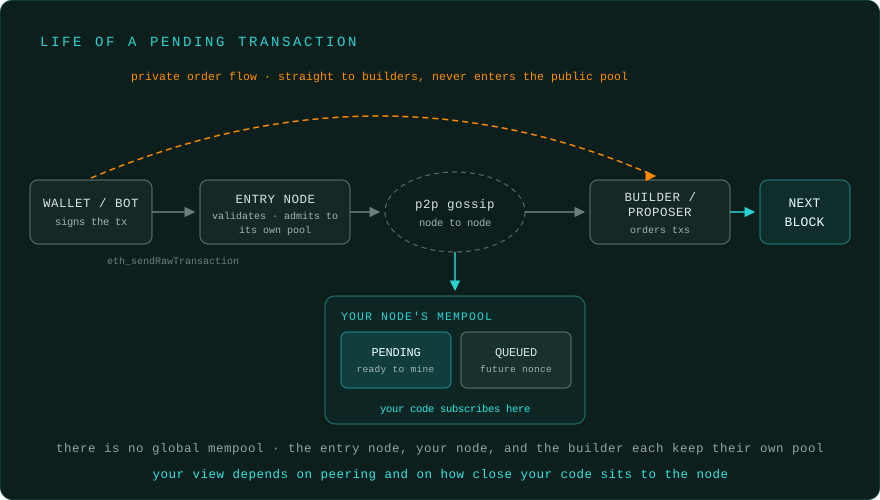
The mempool is the set of transactions a node has received and validated but not yet included in a block. Clients split it into two buckets:
- Pending: transactions that are ready to be mined right now (correct nonce, enough balance, fee high enough to consider).
- Queued: transactions that are valid but not yet executable, usually because they have a future nonce and are waiting on an earlier transaction from the same account.
The crucial thing to internalize is that there is no single, global mempool. Each node keeps its own pool, built up from transactions gossiped to it by its peers. Your view is a function of who you are connected to and how fast transactions propagate to you. Two nodes asked at the same instant will give you two slightly different answers. We come back to why that matters later; for now, just hold onto the idea that “the mempool” is really “this node’s mempool”.
Three ways to read the mempool
There are three practical entry points, and picking the right one is most of the battle.
| Method | Transport | Returns | Best for |
|---|---|---|---|
newPendingTransactions (hashes) |
WebSocket subscription | tx hashes only | a broad firehose you then filter and selectively fetch |
newPendingTransactions (full) |
WebSocket subscription | full tx objects | bots that need calldata the instant a tx arrives |
txpool_content |
request / response | a snapshot of the whole current pool | point-in-time inspection and backlog analysis |
The first two are subscriptions: the node pushes you events as they arrive, which is why they need a WebSocket (or IPC) transport rather than plain HTTP request/response. The third is a one-shot read of everything in the pool right now, useful when you want a picture rather than a stream.
The default newPendingTransactions subscription gives you hashes, not transactions. That is deliberate; broadcasting full bodies to every subscriber is expensive. The catch is that a hash on its own tells you nothing about what the transaction does, so most of the work is turning hashes back into transactions without losing the latency race.
Setting up the project
A pending-transaction stream is a small program. Create a project and install ethers:
mkdir mempool-stream
cd mempool-stream
npm init -y
npm install ethers
Add "type": "module" to package.json so you can use ES module imports, then set up the provider. Streaming requires a WebSocket endpoint, so we autodetect the transport from the URL:
import { ethers } from 'ethers';

// Streaming pending transactions needs a WebSocket endpoint that supports
// newPendingTransactions; many public HTTP endpoints do not.
// On BLAZED.sh, talk to the co-located node over its local WebSocket (ws://eth:8545).
const RPC_URL = process.env.RPC_URL || 'ws://eth:8545';
const provider = RPC_URL.startsWith('ws')
  ? new ethers.WebSocketProvider(RPC_URL)
  : new ethers.JsonRpcProvider(RPC_URL);
Streaming pending transactions
ethers maps its "pending" event onto eth_subscribe("newPendingTransactions"), so subscribing is one line. Each event hands you a hash; to learn anything useful you hydrate it into a full transaction with getTransaction:
async function handlePending(txHash) {
  // Hydrate the hash into a full transaction.
  const tx = await provider.getTransaction(txHash);
  if (!tx || !tx.to) return;

  console.log(`${tx.hash}  to ${tx.to}  ${ethers.formatEther(tx.value)} ETH`);
}

provider.on('pending', (txHash) => {
  handlePending(txHash).catch(() => {}); // ignore txs that drop before we fetch them
});
That getTransaction call is the quiet bottleneck. During busy periods the public mempool sees dozens of new hashes per second, and every one triggers a round-trip to ask the node “what is this?”. Two things go wrong when that round-trip is slow. First, you fall behind the firehose. Second, and worse, the transaction can be mined or dropped in the time it takes your request to travel to a remote node and back, so you get null and never even see what it was. The further your code is from the node, the more of the mempool you simply miss.
How do I retrieve full pending transactions from the mempool, not just hashes?
There are two ways to skip the hydrate step.
The first is to ask the subscription for full bodies up front. Geth supports a second argument to the subscription that streams complete transaction objects instead of hashes:
// Geth: stream full transaction objects, no per-tx getTransaction needed.
provider.send('eth_subscribe', ['newPendingTransactions', true]);
You then read the bodies off the subscription messages directly. This removes the round-trip entirely, at the cost of a heavier stream. Support varies by client and version, so confirm it against the node you actually run.
The second is to read the whole pool at once with the txpool namespace. ethers does not wrap these methods, so call them with send:
async function inspectPool() {
  // A point-in-time snapshot of the entire pool, grouped by account and nonce.
  const pool = await provider.send('txpool_content', []);
  console.log('pending accounts:', Object.keys(pool.pending).length);
  console.log('queued accounts:', Object.keys(pool.queued).length);
}

inspectPool().catch(console.error);
txpool_content returns full transactions grouped into pending and queued, keyed by sender address and then by nonce. It is the right tool when you want a snapshot to analyze rather than a live stream; for example, measuring the current backlog or inspecting one account’s queued transactions. Its lighter cousins txpool_inspect (human-readable summaries) and txpool_status (just counts) are handy when you do not need the full bodies. These methods are not guaranteed on every endpoint: the node has to expose the txpool namespace, and many hosted providers disable it or put equivalent functionality behind provider-specific APIs.
Decoding the stream: spotting Uniswap swaps before they land
A full transaction includes its calldata in tx.data, which means you can decode exactly what a pending transaction intends to do before it is mined. Filter the stream to a contract you care about and parse the call with an Interface:
const WATCH_ADDRESS = '0x7a250d5630B4cF539739dF2C5dAcb4c659F2488D'.toLowerCase(); // Uniswap V2 router

const iface = new ethers.Interface([
  'function swapExactTokensForTokens(uint256 amountIn, uint256 amountOutMin, address[] path, address to, uint256 deadline)',
  'function swapExactETHForTokens(uint256 amountOutMin, address[] path, address to, uint256 deadline)',
  'function swapExactTokensForETH(uint256 amountIn, uint256 amountOutMin, address[] path, address to, uint256 deadline)'
]);

async function handlePending(txHash) {
  const tx = await provider.getTransaction(txHash);
  if (!tx || !tx.to || tx.to.toLowerCase() !== WATCH_ADDRESS) return;

  let decoded;
  try {
    decoded = iface.parseTransaction({ data: tx.data, value: tx.value });
  } catch {
    return; // a call we do not have in the ABI above
  }

  console.log(`${decoded.name}  path ${decoded.args.path.join(' -> ')}`);
}
Now every line you print is a real, pending swap routed through the Uniswap V2 router, decoded into its method and arguments, while it is still in the pool. That is the raw material a searcher works from. A runnable version of this, with a configurable watch address, fee printing, and a socket-error handler so the stream survives transient drops rather than crashing, lives in the mempool-stream companion project. Copy .env.example to .env, set RPC_URL to a WebSocket endpoint that streams pending transactions, run npm install, and run node index.js.
Why does my node only see part of the mempool?
If you compare two nodes, or compare your stream against a public mempool explorer, you will notice you are missing transactions. This is expected, and there are three reasons for it.
- Gossip and peering. Transactions reach you by propagating peer to peer across the network. A node with few peers, or one far from where a transaction originated, sees it later or not at all before it is mined. More and better-connected peers means a fuller, earlier view.
- Pool size limits. Clients cap how much they hold. Geth defaults to roughly 5,000 pending and 1,000 queued slots; when the pool is full it evicts the lowest-priced transactions. Under load, the cheap end of the pool is simply not kept.
- Private order flow. A growing share of valuable transactions never touch the public mempool at all. They are sent directly to builders and relays through private channels such as Flashbots, specifically so that bots watching the public pool cannot see or front-run them. No amount of node tuning surfaces these; they are private by design.
You cannot fix the third point, but you can maximize the first two: run a well-peered node and stay close to it, so that of the transactions that are public, you see as many as possible, as early as possible.
Why latency decides this
Reading the mempool is a race, and the clock starts the instant a transaction is gossiped to your node. Everything between your code and that node is dead time. With a hosted provider, the subscribe-and-hydrate loop runs across the public internet: the pending hash travels to you, your getTransaction travels back, the body travels to you again, all before you have even decided whether to act. Depending on region, TLS, provider routing, load, and client library behavior, that can easily mean tens to hundreds of milliseconds of extra round-trip time per transaction. Treat any specific latency number as illustrative and measure your own path.
Co-location removes that gap. BLAZED.sh runs your container or script on the same server as a fully synced Ethereum node, so you subscribe and hydrate over the node’s local WebSocket instead of the public internet:
// Co-located with the node, so the round-trip never leaves the machine.
const provider = new ethers.WebSocketProvider('ws://eth:8545');
The pending hash, the getTransaction, and the body all stay on one machine. You see the transaction as soon as the node does, and you decode it before a remote bot has finished its first round-trip. This is the answer to “how do MEV bots scan the mempool” at the level that actually matters: not which library they use, but how few hops sit between their code and the pool.
Note: IPC is the maximum-performance local transport for same-machine node access in general. BLAZED.sh may offer IPC in the future; today, use the local WebSocket above on BLAZED.sh. It still keeps the subscribe/hydrate loop on the host instead of sending it across the public internet.
Deploying to BLAZED.sh
To run the stream on the node, package it as a container. A minimal Dockerfile:
FROM node:18-alpine
WORKDIR /app
COPY package*.json ./
RUN npm ci --omit=dev
COPY index.js ./
CMD ["node", "index.js"]
Build and push it to any registry:
docker build -t yourusername/mempool-stream:latest .
docker push yourusername/mempool-stream:latest
Then deploy the container on BLAZED.sh. The platform injects access to a fully synced node, so your ws://eth:8545 connection is local from the first block your bot sees, with predictable credit pricing from your monthly allowance rather than the wide per-method weighting of a remote gateway for a high-volume stream. Normal platform and client safety limits still apply.
Running this locally: the stream needs a WebSocket endpoint that actually serves
newPendingTransactions, and many public HTTP endpoints do not. For local development, pointRPC_URLat a node you run yourself, or at a provider’s WebSocket URL that supports pending subscriptions. Thetxpool_*methods additionally require thetxpoolnamespace to be enabled on the node. The code is identical either way; only the endpoint changes when you deploy on BLAZED.sh.Production caveats: public mempool streams are lossy and peer-dependent, so treat them as signals rather than a complete order book. Add reconnect/backoff logic, bound concurrent
getTransactioncalls so hydration cannot fall behind, persist checkpoints/metrics, and design for transactions that are dropped, replaced, privately routed, or mined before you fetch their full body.
Conclusion
Accessing the mempool comes down to three choices: subscribe to hashes and hydrate them, subscribe to full bodies, or snapshot the whole pool with txpool_content. Decoding turns those raw transactions into intent you can act on. And the partial view is inherent; you will never see private order flow, so the goal is to see as much of the public pool as early as you can. The lever that moves that, more than any code, is distance. Put your bot on the node, and the mempool stops being something you reach across the internet and becomes something you read locally, the moment it arrives.
If you want the latency story in full, see IPC vs HTTP vs WebSocket. For the same “stop querying through a gateway” problem applied to historical logs, see eth_getLogs block range limits. And if you are new to what a node exposes in the first place, our beginner’s guide to Ethereum nodes covers the RPC layer all of this sits on.