Applications that react to blockchain events in real time need low-latency infrastructure, especially when dealing with event filters that return large datasets (liquidation monitors, DEX aggregators, cross-chain bridges).
In this tutorial, we’ll build a webhook service that monitors Ethereum events and sends notifications to configured URLs, using BLAZED.sh’s co-located Ethereum node access for a local path to chain data.
Understanding BLAZED.sh’s Architecture
BLAZED.sh is optimized for Ethereum applications that require consistent low latency and predictable costs. Instead of calling a remote gateway across the public internet, your service runs on the same host as a fully synced Ethereum node and connects today over the node’s local WebSocket endpoint (ws://eth:8545).
IPC is generally the maximum-performance local transport for same-machine node access, and it remains a future BLAZED.sh direction. For current BLAZED.sh deployments, use the local WebSocket endpoint. It still keeps high-volume reads and subscriptions on the host rather than routing them through a remote, usage-metered RPC gateway.
Event Signatures and Topics: The Building Blocks of Ethereum Events
Before diving into the code, it’s important to understand how Ethereum events work under the hood. Every smart contract event is identified by its signature, which is a 32-byte hash that uniquely identifies the event type. When a contract emits an event, this signature becomes the first topic in the event log.
For example, the standard ERC-20 Transfer event has the signature Transfer(address,address,uint256). When hashed using Keccak-256, this becomes 0xddf252ad1be2c89b69c2b068fc378daa952ba7f163c4a11628f55a4df523b3ef. This hash is what we use to filter for specific events across the entire Ethereum blockchain.
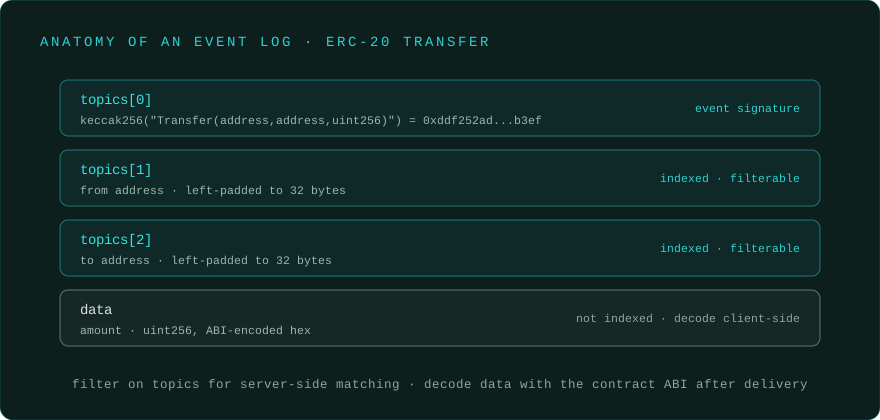
Topics in Ethereum events serve as indexed parameters that allow for efficient filtering. The first topic is always the event signature, while topics 2-4 can contain indexed event parameters. For instance, in a Transfer event, topic 2 might be the sender address and topic 3 the recipient address. This indexing system allows us to create precise filters that only capture the events we care about, rather than processing every transaction on the network.
Setting Up the Project
Let’s start by creating a simple webhook service that demonstrates these concepts in action. We’ll focus on the core functionality without unnecessary complexity.
mkdir eth-webhook-service
cd eth-webhook-service
npm init -y
npm install ethers
Then add "type": "module" to your package.json to enable ES module imports.
The Core Webhook Service
Our webhook service will read configuration from a JSON file and establish event listeners for each configured webhook. Here’s the main implementation:
// webhook-service.js
import { ethers } from 'ethers';
import fs from 'fs';

class EthereumWebhookService {
    constructor() {
        this.provider = null;
        this.webhooks = [];
        this.subscriptions = new Map();

        this.loadConfiguration();
        this.connectToEthereum();
    }

    loadConfiguration() {
        const configData = fs.readFileSync('./config.json', 'utf8');
        const config = JSON.parse(configData);
        this.webhooks = config.webhooks.filter(webhook => webhook.active);
        console.log(`Loaded ${this.webhooks.length} active webhooks`);
    }

    async connectToEthereum() {
        const rpcUrl = process.env.RPC_URL || 'ws://eth:8545';
        this.provider = rpcUrl.startsWith('ws')
            ? new ethers.WebSocketProvider(rpcUrl)
            : new ethers.JsonRpcProvider(rpcUrl);
        const network = await this.provider.getNetwork();
        console.log(`Connected to ${network.name} (Chain ID: ${network.chainId})`);
        this.startEventMonitoring();
    }

    startEventMonitoring() {
        this.webhooks.forEach(webhook => {
            const filter = { address: webhook.contractAddress, topics: [webhook.eventSignature] };

            const eventListener = (log) => this.processEvent(webhook, log);

            this.provider.on(filter, eventListener);
            this.subscriptions.set(webhook.id, { filter, listener: eventListener });

            console.log(`Monitoring ${webhook.name} events`);
        });
    }

    async processEvent(webhook, log) {
        const eventData = {
            webhook: { id: webhook.id, name: webhook.name },
            transaction: { hash: log.transactionHash, blockNumber: log.blockNumber, blockHash: log.blockHash, logIndex: log.index },
            event: { address: log.address, data: log.data, topics: log.topics },
            timestamp: new Date().toISOString()
        };

        await this.deliverWebhook(webhook, eventData);
    }

    async deliverWebhook(webhook, eventData, attempt = 1) {
        const maxAttempts = 3;
        const response = await fetch(webhook.url, {
            method: 'POST',
            headers: { 'Content-Type': 'application/json' },
            body: JSON.stringify(eventData)
        });
        if (!response.ok && attempt < maxAttempts) {
            setTimeout(() => this.deliverWebhook(webhook, eventData, attempt + 1), Math.pow(2, attempt - 1) * 1000);
        }
    }

    start() {
        console.log('Webhook service started');
        process.on('SIGINT', () => {
            this.subscriptions.forEach((subscription) => {
                this.provider.off(subscription.filter, subscription.listener);
            });
            process.exit(0);
        });
    }
}

// Start the service
const service = new EthereumWebhookService();
service.start();
Configuration: Defining What Events to Monitor
The power of this webhook service lies in its configuration flexibility. Create a config.json file that defines exactly which events you want to monitor and where to send notifications:
{
  "webhooks": [
    {
      "id": "usdc-transfers",
      "name": "USDC Transfer Monitor",
      "url": "https://your-app.com/api/webhooks/usdc-transfers",
      "contractAddress": "0xA0b86991c6218b36c1d19D4a2e9Eb0cE3606eB48",
      "eventSignature": "0xddf252ad1be2c89b69c2b068fc378daa952ba7f163c4a11628f55a4df523b3ef",
      "active": true
    },
    {
      "id": "compound-liquidations",
      "name": "Compound Liquidation Events",
      "url": "https://your-app.com/api/webhooks/liquidations",
      "contractAddress": "0x3d9819210A31b4961b30EF54bE2aeD79B9c9Cd3B",
      "eventSignature": "0x298637f684da70674f26509b10f07ec2fbc77a335ab1e7d6215a4b2484d8bb52",
      "active": true
    }
  ]
}
Each webhook configuration specifies the contract address to monitor and the event signature to filter for. The event signature is crucial - it’s the Keccak-256 hash of the event’s function signature. For the standard ERC-20 Transfer event, this signature Transfer(address,address,uint256) hashes to the value shown above.
When monitoring DeFi protocols like Compound, liquidation events have their own unique signatures. The beauty of this approach is that you can monitor any event from any contract simply by knowing its signature and contract address.
Understanding Event Data Structure
When an event occurs, the webhook service receives a log object from ethers.js containing several important fields. The data field contains non-indexed event parameters encoded as hex, while the topics array contains indexed parameters. The first topic is always the event signature, and subsequent topics contain indexed parameters like addresses or token IDs.
For example, when monitoring USDC transfers, the log structure might look like this: the first topic contains the Transfer event signature, the second topic contains the sender address (padded to 32 bytes), the third topic contains the recipient address, and the data field contains the transfer amount. Understanding this structure allows you to decode and process events appropriately in your webhook handlers.
Deploying to BLAZED.sh
To deploy your webhook service, build and push your container image to a registry (Docker Hub, GitHub Container Registry, etc.):
FROM node:18-alpine
WORKDIR /app
COPY package*.json ./
RUN npm ci --omit=dev
COPY webhook-service.js config.json ./
CMD ["node", "webhook-service.js"]
Build and push your image:
docker build -t yourusername/eth-webhook:latest .
docker push yourusername/eth-webhook:latest
Then deploy the container on BLAZED.sh with RPC_URL=ws://eth:8545 (or leave the code’s default in place). The platform provides a local WebSocket path to fully synchronized Ethereum nodes with predictable, simply-weighted credit pricing.
Testing Your Webhook Service
To test your webhook service locally, you can create a simple HTTP server that logs incoming webhooks:
// test-receiver.js
import http from 'http';

const server = http.createServer((req, res) => {
    if (req.method === 'POST') {
        let body = '';
        req.on('data', chunk => body += chunk);
        req.on('end', () => {
            const webhook = JSON.parse(body);
            console.log('Received webhook:', webhook.webhook.name, webhook.transaction.hash);
            res.writeHead(200, { 'Content-Type': 'application/json' });
            res.end(JSON.stringify({ received: true }));
        });
    }
});
server.listen(8080, () => console.log('Test receiver on port 8080'));
Update your config.json to point to http://localhost:8080 and run both services to see events flowing in real-time.
Running this locally: use a WebSocket URL if you want live
provider.on(filter)subscriptions. If you only have HTTP, use the companion sample’sgetLogspolling loop instead; it delivers the same webhook payload shape and works against standard HTTP RPC endpoints. Theeth_getLogscalls used for catch-up and polling remain subject to provider block-range/result caps, so chunk larger backfills.
Production caveats
The example is intentionally small. Before using it as production infrastructure, add a few safeguards:
- Reorg handling. WebSocket log subscriptions may emit removed logs, and polling near the head can see events that later disappear. Store
blockHash/logIndex, wait for confirmations when correctness matters, and roll back records from reorged blocks. - Catch-up chunking. If the service is offline for a long time, do not call
eth_getLogsover the whole gap in one request. Chunk ranges and handle the single-block edge case where a very dense filter still exceeds a provider result cap. - Streaming vs memory. Deliver or persist each log as you process it. Avoid collecting large backfills into an in-memory array.
- Provider capabilities. Standard
eth_*log filters work broadly, but namespaces liketxpool,debug, andtraceare provider- and plan-specific. Check what your endpoint exposes before relying on those APIs. - Webhook idempotency. Retries mean receivers should de-duplicate by
(transactionHash, logIndex, blockHash)and tolerate repeated deliveries.
Advanced Event Filtering and Multiple Topics
While our basic example monitors all events of a specific type from a contract, you can create more sophisticated filters using multiple topics. For instance, if you only wanted to monitor USDC transfers to a specific address, you could modify the event listener setup:
const filter = {
    address: webhook.contractAddress,
    topics: [webhook.eventSignature, null, ethers.zeroPadValue('0x742d35Cc6634C0532925a3b8D12C0b5cb5aAa101', 32)]
};
This level of precision ensures your webhook service only processes the events that matter to your application, reducing noise and improving performance.
Cost Considerations
Event monitoring costs scale with volume. A DEX aggregator tracking all Uniswap V3 pools might process thousands of swap events per block during volatile periods. On usage-based infrastructure, that adds up fast.
BLAZED.sh uses per-request credit accounting, but with a simple, mostly-uniform weight (most calls are 1 credit) and a credit balance granted monthly by your subscription, which makes event-heavy services easier to forecast than wide per-method compute units. The event subscription and reads draw credits; the outbound webhook deliveries themselves are not separate RPC calls. Normal platform and client safety limits still apply. This works well for:
- Trading bots monitoring multiple DEX pools
- Liquidation services tracking positions across lending protocols
- NFT tools monitoring collections for rare traits
- Cross-chain bridges processing high volumes of transfer events
Conclusion
The webhook service above is a working starting point for real-time Ethereum event monitoring. The key pieces are ethers.js event filters, a config-driven webhook setup, and retry logic for delivery. Pair it with BLAZED.sh’s local WebSocket access and predictable credit-based RPC pricing for event-heavy workloads; the deployment docs cover running this service straight on the node.